Bookmarks & Frecency
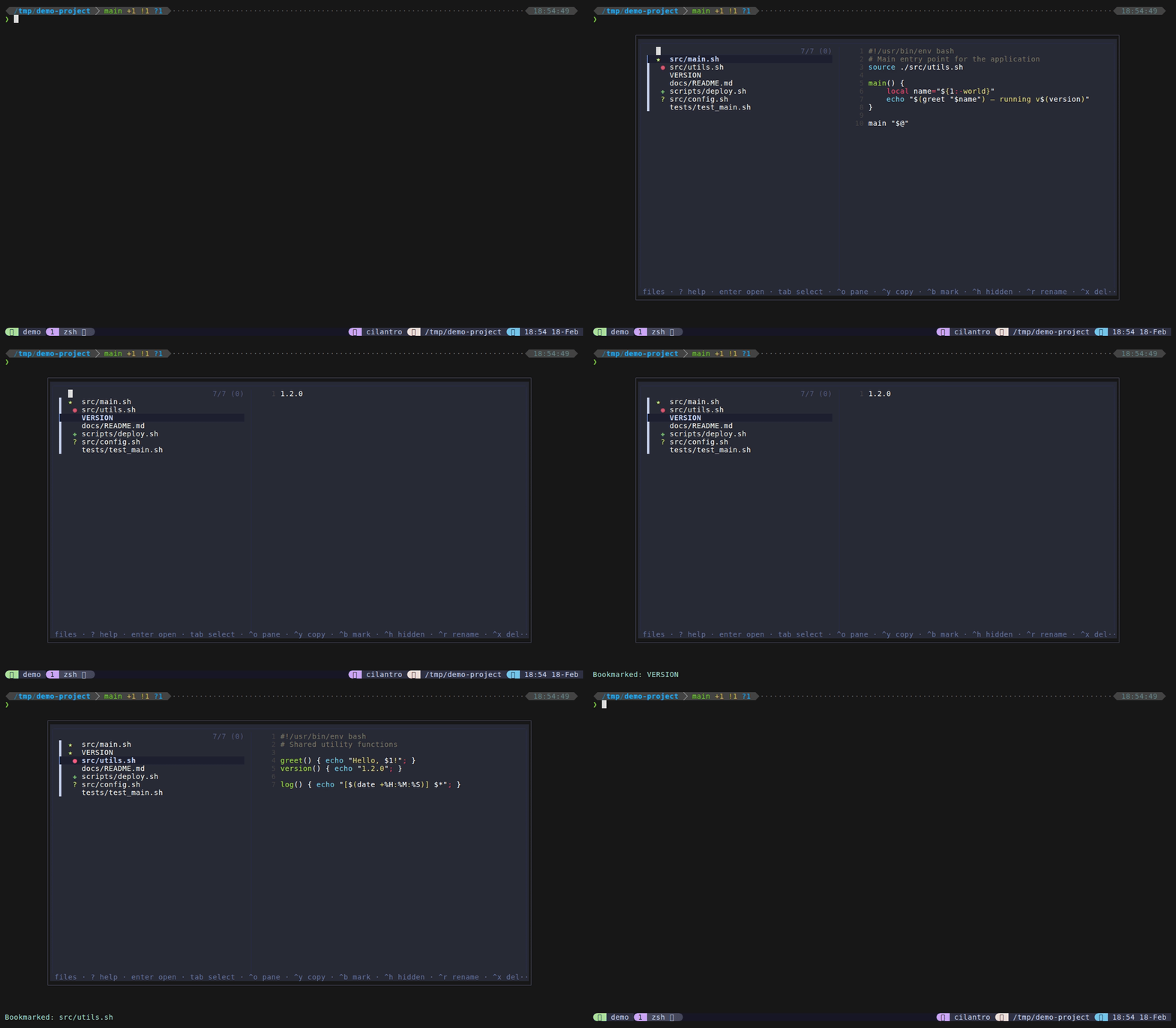
tmux-dispatch provides two complementary systems for surfacing the files you care about most: bookmarks for explicit pinning and frecency for automatic ranking based on usage patterns.
Bookmarks
Bookmarks pin important files to the top of the file finder list. They persist across sessions and are scoped per-directory, so bookmarks in one project don’t appear in another.
Usage
- Press
Ctrl+Bin files mode to toggle a bookmark on the selected file - Bookmarked files show a gold star indicator in the file list
- Bookmarked files always appear at the top, before frecency-ranked and regular files
How bookmarks work
- Stored in
~/.local/share/tmux-dispatch/bookmarks(or$XDG_DATA_HOME/tmux-dispatch/bookmarksifXDG_DATA_HOMEis set) - Format: tab-separated
directory<TAB>filenameentries, one per line - Per-directory scoping: bookmarks for
/home/user/project-a/don’t appear when you’re in/home/user/project-b/ - The
toggle_bookmarkfunction inhelpers.shadds or removes entries usinggrep -xFfor exact matching – there is no risk of partial matches - After toggling a bookmark, the file list reloads immediately so the change is reflected
Example
If you bookmark src/index.ts while in /home/user/myapp, the bookmarks file gets this entry:
/home/user/myapp src/index.ts
That file will appear at the top of the list only when you open tmux-dispatch from /home/user/myapp.
Frecency
Frecency combines frequency and recency to rank files you’re likely to want again. This is the same concept used by Firefox’s address bar and zoxide for directory navigation.
How it works
- Every time you open a file (via
EnterorCtrl+O), a timestamped entry is appended to the history file at~/.local/share/tmux-dispatch/history - When the file finder loads,
recent_files_for_pwdcalculates a score for each file using the formula below - Files are ranked by score (highest first), deduplicated, and existence-checked (deleted files are silently skipped)
- The top 50 frecency files appear after bookmarks but before the regular
fd/findlisting - The history file is automatically trimmed: when it exceeds 2000 lines, it’s truncated to the most recent 1000 entries (async, non-blocking)
Score formula
score(file) = sum( 10 / (age_hours + 1) ) for each access
Each time you open a file, a new access record is created. The score is the sum of all access records for that file, weighted by recency:
| Scenario | Score per access |
|---|---|
| Opened 1 hour ago | 10 / 2 = 5.0 |
| Opened 6 hours ago | 10 / 7 = 1.4 |
| Opened 24 hours ago | 10 / 25 = 0.4 |
| Opened 1 week ago | 10 / 169 = 0.06 |
Multiple accesses stack: a file opened 3 times in the last hour scores approximately 15 points, easily outranking a file opened once yesterday.
The +1 in the denominator prevents division by zero for files opened within the current hour and provides a smooth decay curve.
Disable frecency
To disable frecency tracking and ranking:
set -g @dispatch-history "off"
This disables both recording new access events and ranking files by frecency. Bookmarks still work independently.
File Order in the File Finder
The file finder list is constructed in this order:
- Bookmarked files – from the bookmarks file, filtered to the current directory
- Frecency-ranked files – top 50 from the history file (if
@dispatch-historyison) - All files – from
fdorfind
The entire list is deduplicated (first occurrence wins), so a bookmarked file won’t appear again in the frecency section, and a frecency-ranked file won’t appear again in the fd/find section. This means bookmarks always win, frecency comes second, and everything else follows.
When @dispatch-file-types is set, the extension filter is applied to the final deduplicated list, so it affects bookmarks and frecency results as well as the fd/find output.
Data Storage
| File | Purpose | Location |
|---|---|---|
bookmarks | Bookmark entries (directory + filename pairs) | ~/.local/share/tmux-dispatch/bookmarks |
history | File access timestamps for frecency scoring | ~/.local/share/tmux-dispatch/history |
Both files respect $XDG_DATA_HOME if set. The default data directory is ~/.local/share/tmux-dispatch/.
The history file format is tab-separated: directory<TAB>filename<TAB>unix_timestamp. Old entries without timestamps are treated as 1 week old (low score but not zero).