File Finder
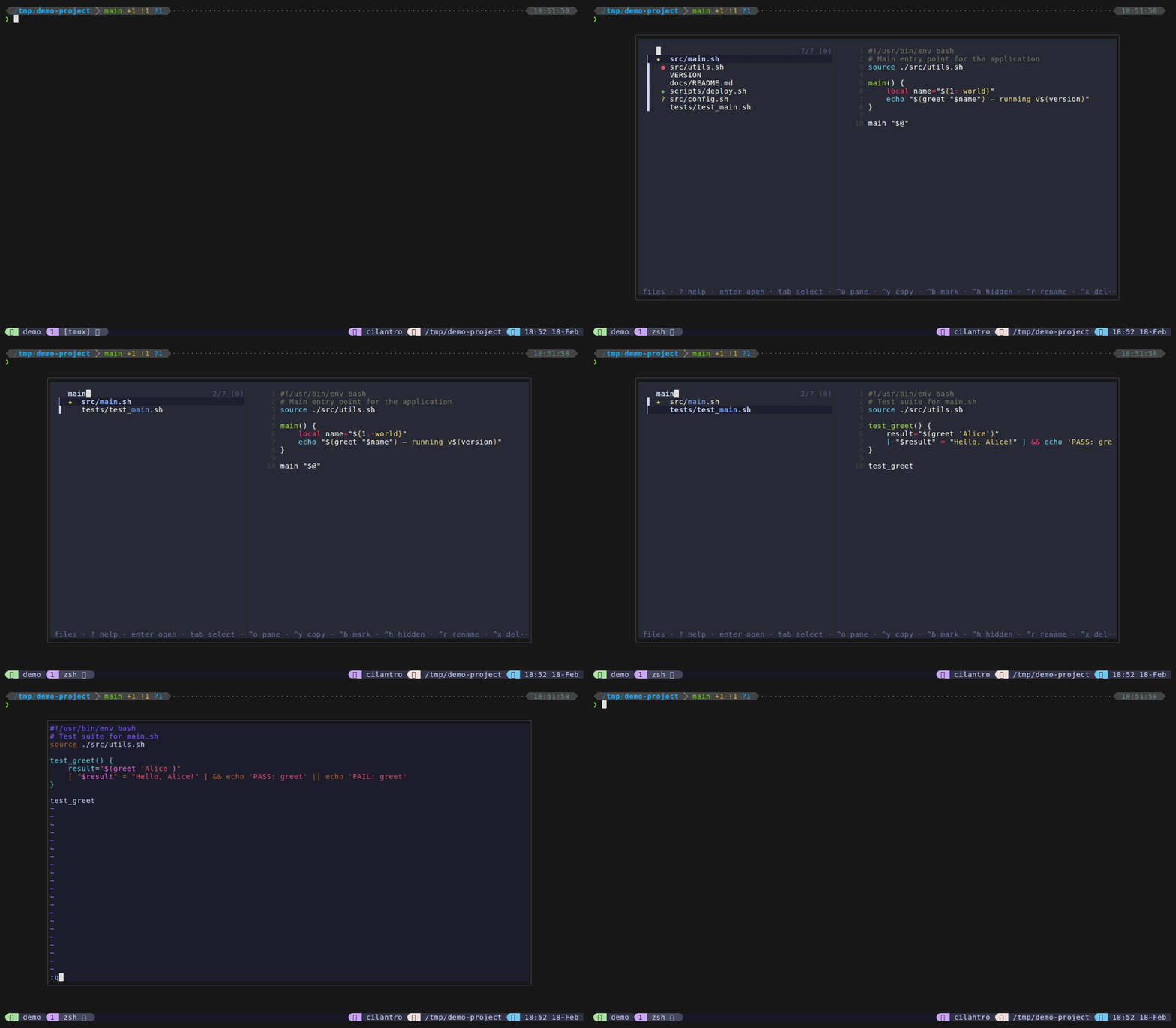
The file finder is the home mode of tmux-dispatch. When you open the popup (Alt+o), files mode launches with fd/find listing files and a bat preview on the right. A welcome cheat sheet appears when the query is empty, reminding you of all available keybindings and mode prefixes – it disappears as soon as you start typing or navigating.
Type to filter files instantly. Bookmarked files show a gold star and appear first, frecency-ranked recently opened files follow, then the rest. Each file can also display a colored git status icon inline, so you can see at a glance which files have uncommitted changes.
Keybindings
| Key | Action |
|---|---|
Enter | Edit file in popup (vim/nvim) |
Ctrl+O | Send $EDITOR file to originating pane |
Ctrl+Y | Copy file path to clipboard |
Ctrl+B | Toggle bookmark (starred indicator, pinned to top) |
Ctrl+G | Open marks (global bookmarks) |
Ctrl+H | Toggle hidden files (shown by default) |
Ctrl+R | Rename file inline |
Ctrl+X | Delete file(s) with confirmation |
Tab / Shift+Tab | Toggle multi-selection |
Ctrl+D / Ctrl+U | Scroll preview down/up |
? | Show help cheat sheet in preview |
Escape | Close popup |
Mode switching prefixes
Type these as the first character in the query to switch modes. The remainder of the query carries over.
| Prefix | Switches to |
|---|---|
> | Live Grep |
@ | Sessions |
! | Git Status |
# | Directories |
$ | Scrollback Search |
: | Custom Commands |
~ | Files from $HOME |
See Mode Switching for details on how prefix-based navigation works.
Features
- Welcome cheat sheet – appears when the query is empty, showing all keybindings and mode prefixes. Disappears on the first keystroke or navigation action.
- Bookmarks – press
Ctrl+Bto bookmark a file. Bookmarked files display a gold star and are pinned to the top of the list. Bookmarks persist across sessions. - Frecency ranking – recently and frequently opened files float toward the top of the list, ranked by a decay-weighted score.
- Git status indicators – colored icons appear next to filenames with uncommitted changes: green
✚(staged), red●(modified), purple✹(both staged and unstaged), yellow?(untracked). Disable with@dispatch-git-indicators "off". - Hidden file toggle – press
Ctrl+Hto toggle hidden (dotfile) visibility. Hidden files are shown by default; the toggle resets each time the popup opens. - File type filters – restrict results to specific extensions using
@dispatch-file-types. - Multi-select – use
Tab/Shift+Tabto select multiple files, thenEnterto open all sequentially orCtrl+Yto copy all paths. - Dual-action editing –
Enteropens in the popup editor (runs inside the popup), whileCtrl+Osends the open command to your originating tmux pane (useful for GUI editors or keeping context). - Mode switching – type a prefix character to switch modes without closing the popup.
- Preview system – syntax-highlighted file preview via bat, with a head fallback when bat is not installed.
Configuration
| Option | Default | Description |
|---|---|---|
@dispatch-find-key | M-o | Keybinding to open file finder |
@dispatch-popup-editor | auto-detect | Editor for popup (nvim > vim > vi) |
@dispatch-pane-editor | $EDITOR | Editor for send-to-pane (Ctrl+O) |
@dispatch-fd-args | "" | Extra arguments passed to fd |
@dispatch-history | on | Enable frecency ranking |
@dispatch-git-indicators | on | Show git status icons next to files |
@dispatch-file-types | "" | Restrict to file extensions (comma-separated, e.g. "ts,tsx,js") |
Global Marks
Press Ctrl+G in files mode to open the marks sub-view – a cross-project view of all your bookmarked files, displayed as tilde-collapsed absolute paths (e.g., ~/Projects/api/routes.ts).
| Key | Action |
|---|---|
Enter | Open file in editor (cds to file’s directory) |
Ctrl+O | Send file path to originating pane |
Ctrl+Y | Copy absolute path to clipboard |
Ctrl+B | Remove bookmark (unbookmark with list reload) |
Ctrl+G | Return to files mode (toggle) |
Backspace on empty | Return to files mode |
? | Show help cheat sheet in preview |
- Adding marks: Bookmark any file with
Ctrl+Bin files mode. Bookmarked files appear both in the local list (with a star indicator) and in the global marks view. - Removing marks: Press
Ctrl+Bin marks view to unbookmark a file. The list reloads automatically. - Directory-aware editing: When you open a file from marks, the editor starts in that file’s directory, so LSP and relative imports work correctly.
- File existence checking: Bookmarks pointing to deleted files are automatically hidden.
Tips
- Use
@dispatch-file-types "ts,tsx,js"to filter file types in large repos – only matching files will appear. - Bookmarked files persist across sessions, stored in
~/.local/share/tmux-dispatch/bookmarks. - The welcome cheat sheet is a quick reminder of all keybindings – it disappears as soon as you start typing.
- Multi-select with
Tab, thenEnteropens all selected files sequentially in the popup editor. - fd is optional – if not installed, the plugin falls back to
find. bat is also optional, falling back tohead.